


![Why Catalog Match Rate Matters More Than You Think [Guide]](/_next/image?url=https%3A%2F%2Fstrapi.omegatheme.com%2Fuploads%2Flarge_catalog_match_rate_ce304b7458.jpg&w=3840&q=75)
Catalog match rate is an important metric that directly affects how well your products are matched with customer data in Meta ads. Knowing how it works will enable you to maximize its potential to improve accuracy in product targeting and campaign results.
What is Catalog Match Rate?
Catalog match rate shows how often the items people interact with on your store, such as viewed or added-to-cart products, match products in your Meta catalog.
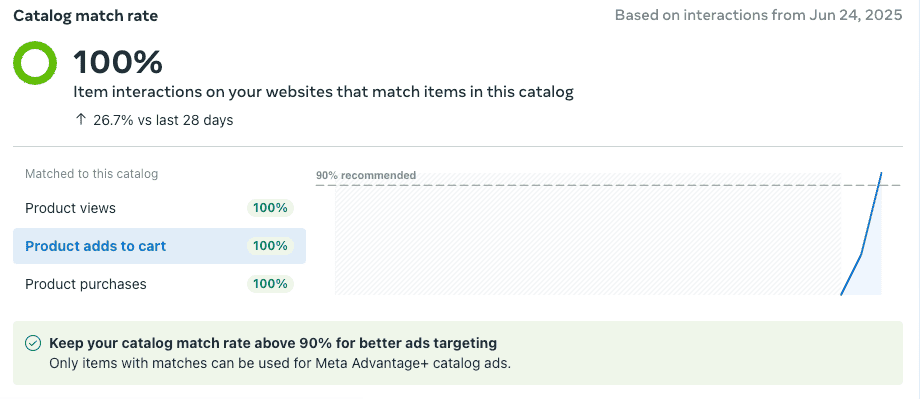
In other words, it is a measure of how well your website’s activities match up with your catalog’s data. A good catalog match rate is above 75%, while an ideal rate is above 90% to maximize the potential of dynamic ads.
How to Calculate Catalog Match Rate?
Formula:
Catalog Match Rate = (Number of matched content IDs / Total number of content IDs received) × 100
Here, “matched content IDs” means the content IDs sent through events that Meta can successfully match to products in your connected catalog.
Example:
For example, if your pixel receives 1,000 content IDs through events and 850 of them are successfully matched to items in your catalog, your catalog match rate is 85%.
Catalog Match Rate = (850 ÷ 1000) × 100 = 85%
This means 15% of your content ID is not being matched, which could impact your ad performance and retargeting accuracy.
Why Catalog Match Rate Matters
Catalog match rate directly impacts how effectively your ads perform and scale. Here is why it plays such a role:
Enables Better Retargeting and Prospecting
Without a match, platforms cannot show users the exact products they viewed or interacted with. This weakens both retargeting and broader Advantage+ catalog campaigns.
As a result, your ads become more generic rather than personalized, and users are less likely to return and complete their purchase.
Maximizes Ad Reach
A low match rate does not stop your catalog ads from running, but it does reduce dynamic relevance. When fewer interactions are matched to the right catalog items, ad personalization becomes less precise and performance can suffer.
In other words, you are losing potential visibility for products that users have already shown interest in. This directly reduces your campaign reach and impact.

Improves ROI and Lowers Costs
When your catalog match rate is strong, Meta gets a clearer view of which products are actually connected to user behavior. That makes it easier for the system to show the right item to the right person instead of relying on weaker signals.
Over time, that accuracy can influence auction performance too. Ads that feel more relevant tend to earn more clicks and better engagement, which can support stronger quality ranking in Meta’s system. That often leads to more efficient CPMs, and once traffic becomes more qualified, CPA has more room to come down while ROAS moves in a better direction.
Supports Accurate Optimization
Meta needs to link user intent to specific catalog items, not just collect event data. A high match rate gives the system stronger product-level signals for delivery and bidding.
A low match rate reduces matched content IDs, which weakens learning and slows optimization. In some cases, campaigns may take longer to exit the learning phase.
Catalog Match Rate Benchmarks
Understanding where your match rate stands helps you quickly identify performance issues and optimization opportunities, based on Meta’s beta insights and industry benchmarks.
Match Rate | Status | Action |
| 90% – 100% | Excellent | Optimal performance. Data is tracking correctly. |
| 75% – 89% | Good | Working well, but there’s room to optimize. |
| Below 75% | Poor | Needs immediate attention. Data loss is likely. |
👉 If your match rate falls below 75%, you should prioritize fixing tracking issues immediately to avoid wasting ad spend.
How to Check Your Catalog Match Rate
To check your Catalog Match Rate in Meta, follow these steps in Meta Commerce Manager:
Step 1: Open Commerce Manager
Go to Commerce Manager and choose the catalog you want to check.
Make sure you choose the correct catalog linked to your ads and tracking setup.
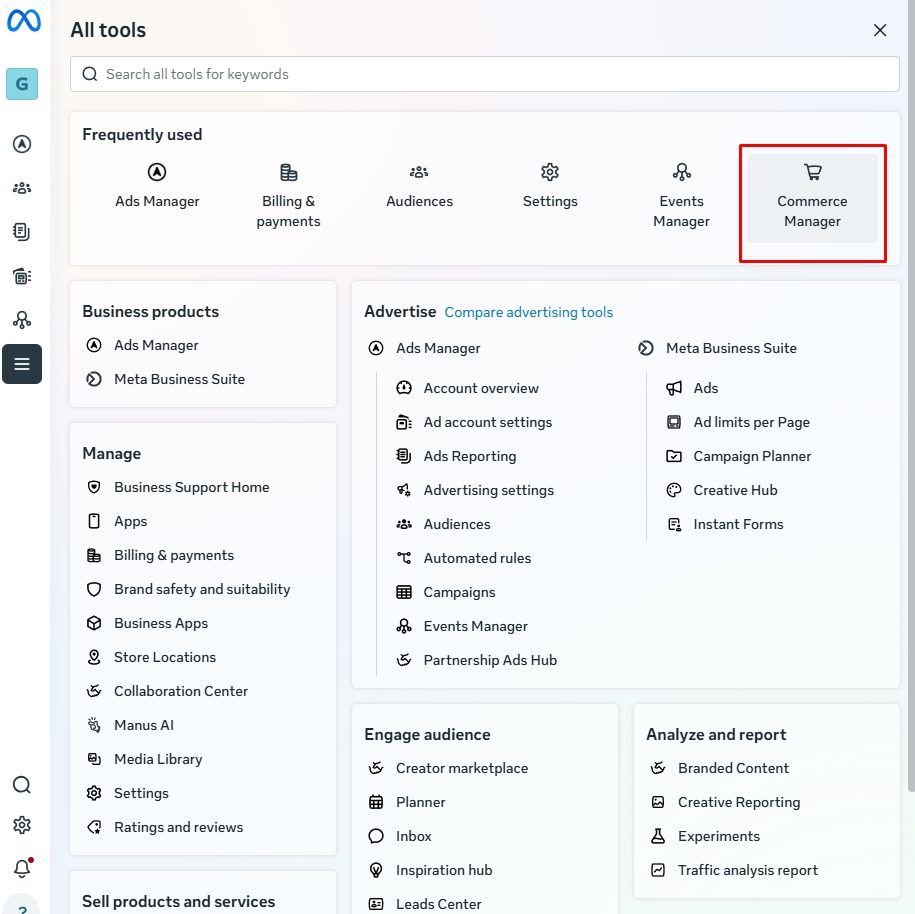
Step 2: Open the Events section
In the left menu, click Events under that catalog.
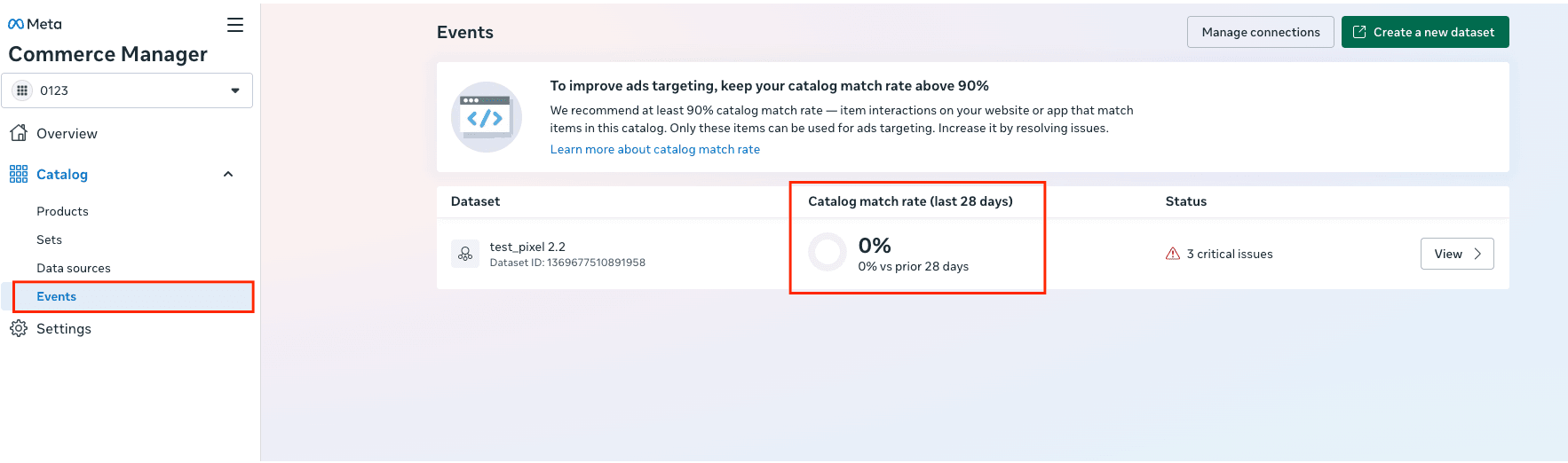
Step 3: Review the Catalog Match Rate
You will see the Catalog Match Rate for the last 28 days shown in the dashboard.
Step 4: Click View for more details
Click View next to the dataset to inspect issues and see what may be affecting product matching.
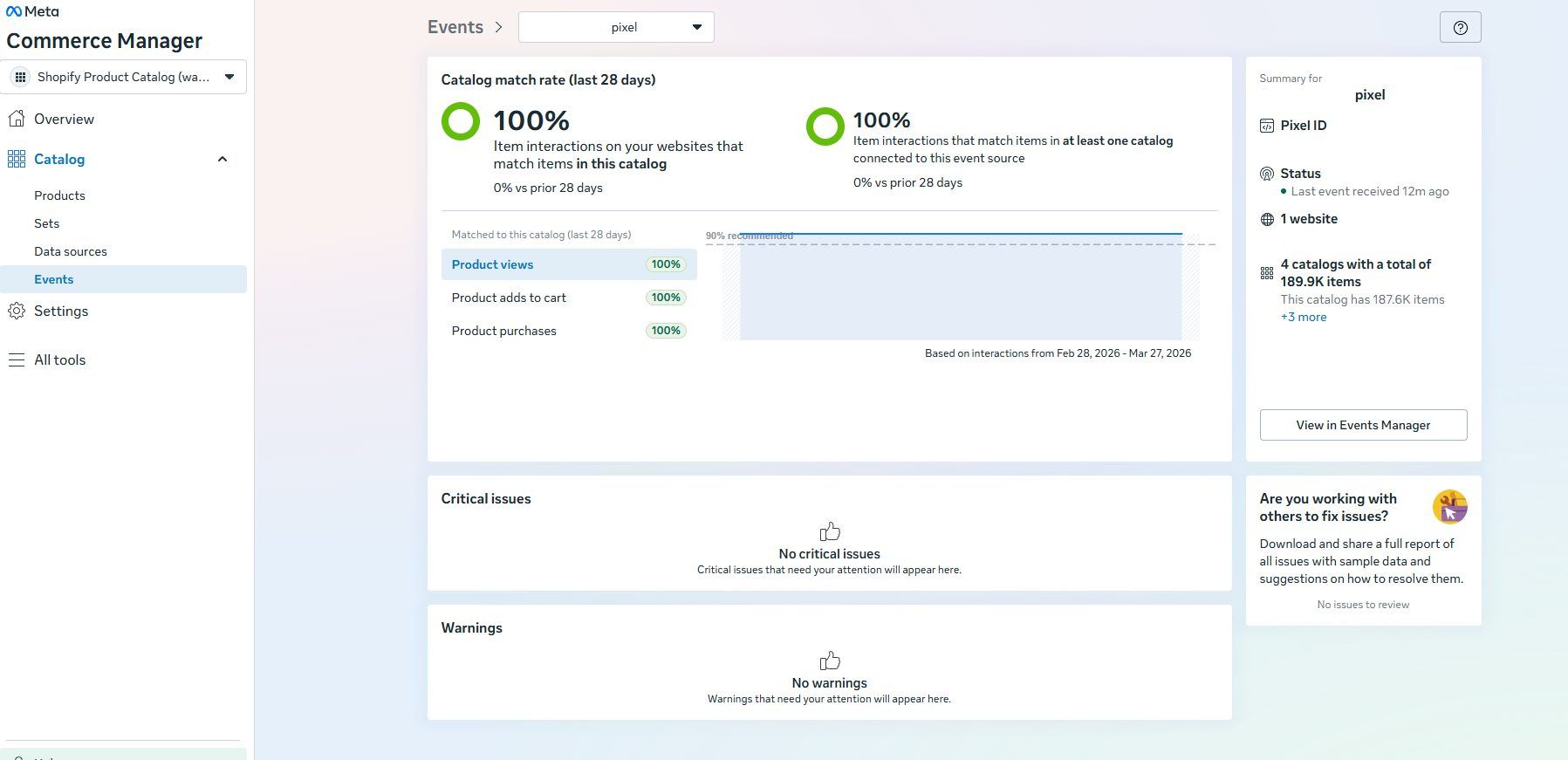
Common Reasons for Low Match Rates
Catalog Match Rate often drops when there is a problem between your tracking setup and catalog data. Here are the most common causes:
- Mismatched Content IDs: The content_ids sent by your pixel do not match the IDs in your Meta catalog. Even a small difference will disrupt the match.
- Wrong Parameter Setup: Match issues can happen when identifier parameters do not match the tracking source. On websites, Meta Pixel typically uses content_ids as an array, while mobile App Events use content_id in singular form. Both are valid in the right context, but using the wrong format can break product matching.
- Missing Catalog Items: A product may exist in the store but not yet appear in the Meta catalog, so related events cannot be matched.
- Multiple Catalogs Connected: When one pixel is linked to multiple catalogs, the match data can be split. This results in lower match rates when viewing a specific catalog.
- Pixel or Dataset Not Linked: Your Meta Pixel or SDK must be properly connected to the catalog in Commerce Manager. Otherwise, events cannot be matched.
- Non-Unique IDs: If one ID is used for multiple products, it causes confusion and lowers matching accuracy.
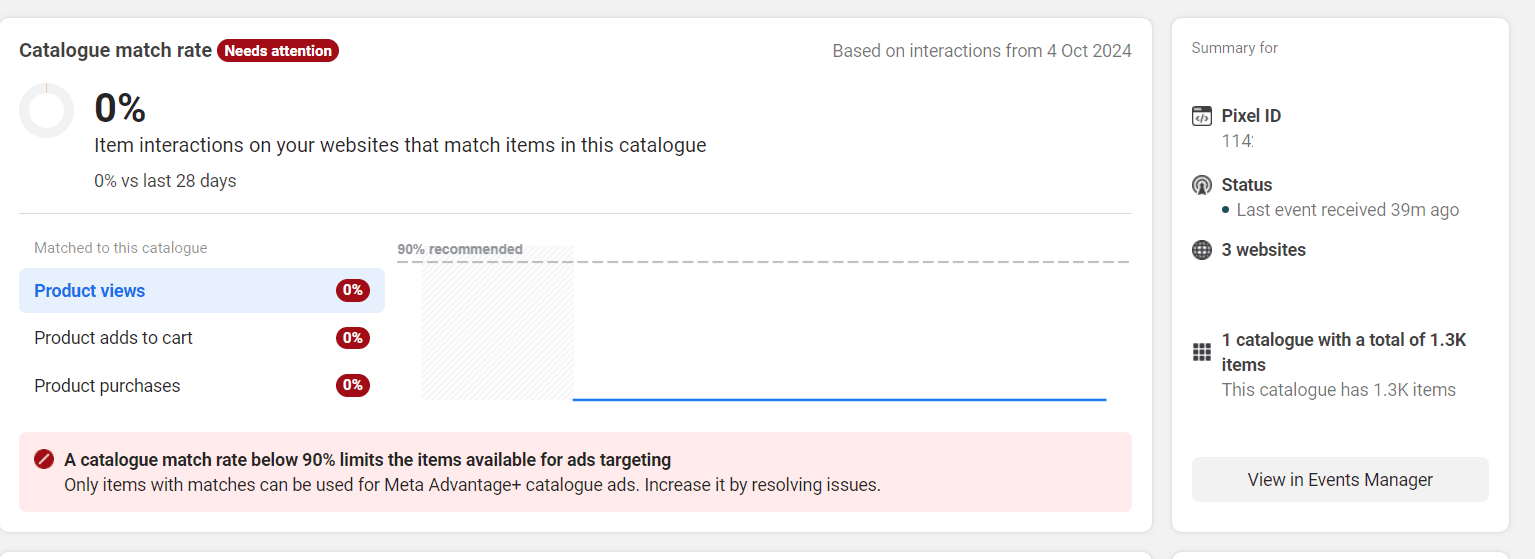
How to Improve Meta Catalog Match Rate
To improve your Meta Catalog Match Rate, you need to make sure the IDs sent from your website perfectly match the IDs stored in your Meta catalog. Here’s how to fix the most common issues:
1. Match Your ID Formats
First, make sure to align your identifiers because Meta looks for an exact string match between events and catalog items.
Verify that the content_ids sent by your pixel are the same as the ID in your catalog feed and that you're not sending variant IDs and parent IDs at the same time.
2. Verify Pixel Parameters
Also, verify how you're sending data from your pixel using Meta Pixel Helper. A small mistake in the format might cause issues.
Verify that you're using content_ids in an array and not a string, and that you're using the right content_type, like 'product' or 'product_group'.
3. Sync Your Feed Frequency
If your catalog updates too slowly, products may be tracked on your site before they appear in Meta’s catalog. When that happens, related events cannot be matched right away, which can lower your Catalog Match Rate.
Meta supports catalog sync through data feeds and the Catalog API, with scheduled updates that can run hourly, daily, or weekly. This is the right way to keep product data current inside the catalog.
💡 To reduce delays, avoid relying too much on manual uploads, especially if your catalog changes often. A scheduled feed or a catalog management tool like Omega Google & Facebook Feed can help keep product data and IDs aligned. Conversions API is not for product sync, because it sends event data, not catalog items.
4. Connect the Correct Data Source
Verify that the pixel or dataset is connected to the right catalog in Commerce Manager. If not, events will not match at all.
Also, make sure not to connect multiple irrelevant pixels, as this will decrease the match rate.
5. Use Microdata Tagging
Meta can read product information from your website through product microdata, including Open Graph and Schema.org markup. These tags help provide additional context about your products and can support better data interpretation across Meta’s systems.
While microdata does not directly increase Catalog Match Rate, it can still help reinforce product consistency and improve overall data quality when used alongside accurate event tracking and catalog setup.
6. Clean Up Your Catalog
Lastly, it is essential to keep your catalog clean and free from issues to avoid unnecessary matches.
Remove old products and fix feed issues, such as missing IDs or incorrect formats in Commerce Manager, to keep your match rate high.

Optimize Catalog Match Rate with Omega Feeds
Keeping your product feed accurate and consistently updated can be difficult, especially when your catalog changes frequently. Even small delays or mismatches in product data can quickly lower your Catalog Match Rate.
With Omega Google & Facebook Feed, you can automate feed updates, maintain consistent product IDs, and reduce manual errors, making it easier to keep your catalog aligned with your tracking data over time.
Best Practices to Maintain a High Match Rate
Maintaining a high Catalog Match Rate is not about fixing it once; it’s about keeping it consistent across all of your stack. Here are the top practices that you should keep in mind:
- Use one consistent ID: Use a single ID, whether it’s the SKU or database ID, across all of your pixels, CAPI, and product feed.
- Implement CAPI: Implement CAPI for server-side tracking. This will prevent ad blockers from causing data loss and ensure that event_id remains consistent across all of your events.
- Sync your feed frequently: Syncing your catalog frequently, ideally every hour, will ensure that any changes, including removing a product, are updated as soon as possible.
- Add microdata tags: Adding microdata tags, such as og:product:id, will allow us to continue matching the content ID without pixel data.
- Monitor errors weekly: Ensure that errors are checked once a week by reviewing the Issues tab in Commerce Manager.
- Keep integrations consistent: Avoid mixing multiple tools with different ID formats. Use one reliable setup across your stack.
Conclusion
If your Catalog Match Rate is not correct, everything else suffers. Your ads are not relevant, retargeting is not working correctly, and you are spending more money for less.
It is essential to keep things simple. Ensure your IDs are correct, your feed is up to date, and your tracking is clean. If your Catalog Match Rate is in good condition, your ads just work better, and the results follow.